The Support ticket
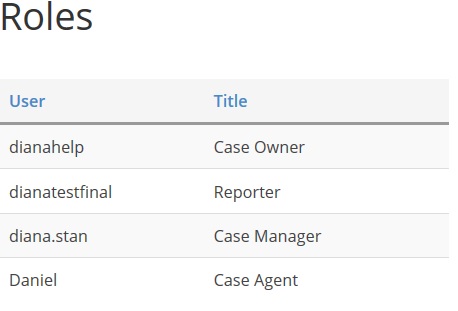
If you have arrived on this page, it means that you are the case owner of the submitted support ticket. Check the Roles section to follow all the actors on this case.
Ticket's Roles
- Case Owner;
- Case Manager - the DNN Sharp representative who will manage the ticket in question;
- Case Agent - the DNN Sharp representative who will assist on the discussion;
- Reporter - an active user on the DNN Sharp Community who has the same issue.
Ticket's Statuses
A case can have one of the following statuses:
- New - a freshly created support ticket with no comments;
- Waiting for support - this status appears when a comment is added by a case owner or reporter;
- Waiting for customer - when the case manager or case agent is waiting for your response;
- Resolved - if the issue is solved, this status can be set by the case owner or case manager;
- In progress - the ticket is assigned to one of the DNN Sharp developers in order to be resolved;
- Review Priority - the case in question which contains a reported bug or a requested feature is not assigned to be fixed.
Ticket's Comments
Ticket's Worklog
All the above user's actions are highlighted in the Worklog Section:
- {User:Username} opened a new support ticket;
- {User:Username} posted a reply;
- {User:Username} created a new topic;
- {User:Username} edited the case;
- {User:Username} edited a comment;
- {User:Username} made a comment hidden;
- {User:Username} made a comment public;
- {User:Username} requested private mode for the support ticket;
- {User:Username} canceled private mode for the support ticket;
- {User:Username} made the support ticket private;
- {User:Username} made the support ticket public;
- {User:Username} changed the status in 'Resolved';
- {User:Username} has the same issue and was assigned as Reporter;
- {User:Username} was assigned to this support ticket;
- {User:Username} commented on the support ticket and was added as 'Other User';
- {User:Username} was removed from this support ticket. (Reporter)
- {User:Username} requested Premium Support for this ticket
- {User:Username} canceled Premium Support for this ticket
Ticket's Notifications
A user can be notified when one of the following action is made:
- New topic was created
- New Reply was added
- Case Details was modified
- Private Request Status was modified
- Case Access changes were made
- User was added or removed
Users' Requests
- Request private case - can be made by a case owner when sensitive information is shared. Note that a private case is visible only to a case manager or a case owner
- Request premium support - can be done by a case owner to get priority for his case. After the request is approved by the case manager a new Premium support field will be displayed.
Users' Rights
Edit - at any point of time you can change the case content and the reply content using Edit buttons;
Click Save to keep the changes;
Cancel if you have second thoughts;
Enable Private option when sensitive data are shared.